SteamExplainer
New
Steam Personal Calendar: how Steam picks the new and upcoming games it shows you, and how to filter it
Steam's Personal Calendar became a full feature of the Steam store on Oct. 23, 2026, after a Steam Labs test that began in October 2025, Valve announced. It shows each player a personal list of recently released and upcoming games, sorted by release day. Steam builds it from the games you play the most: it finds players with similar playtime, then surfaces games those players wishlist or play. The recommendations refresh every day, the dedicated calendar page covers eight weeks of releases, and a shorter version sits on the store front page. Valve says nobody pays for a spot and nobody picks the games by hand. Players click on more than 2,000 different games in the calendar on an average day. It works on desktop PC, mobile devices and SteamOS devices such as the Steam Deck.
- PC
- Steam Deck
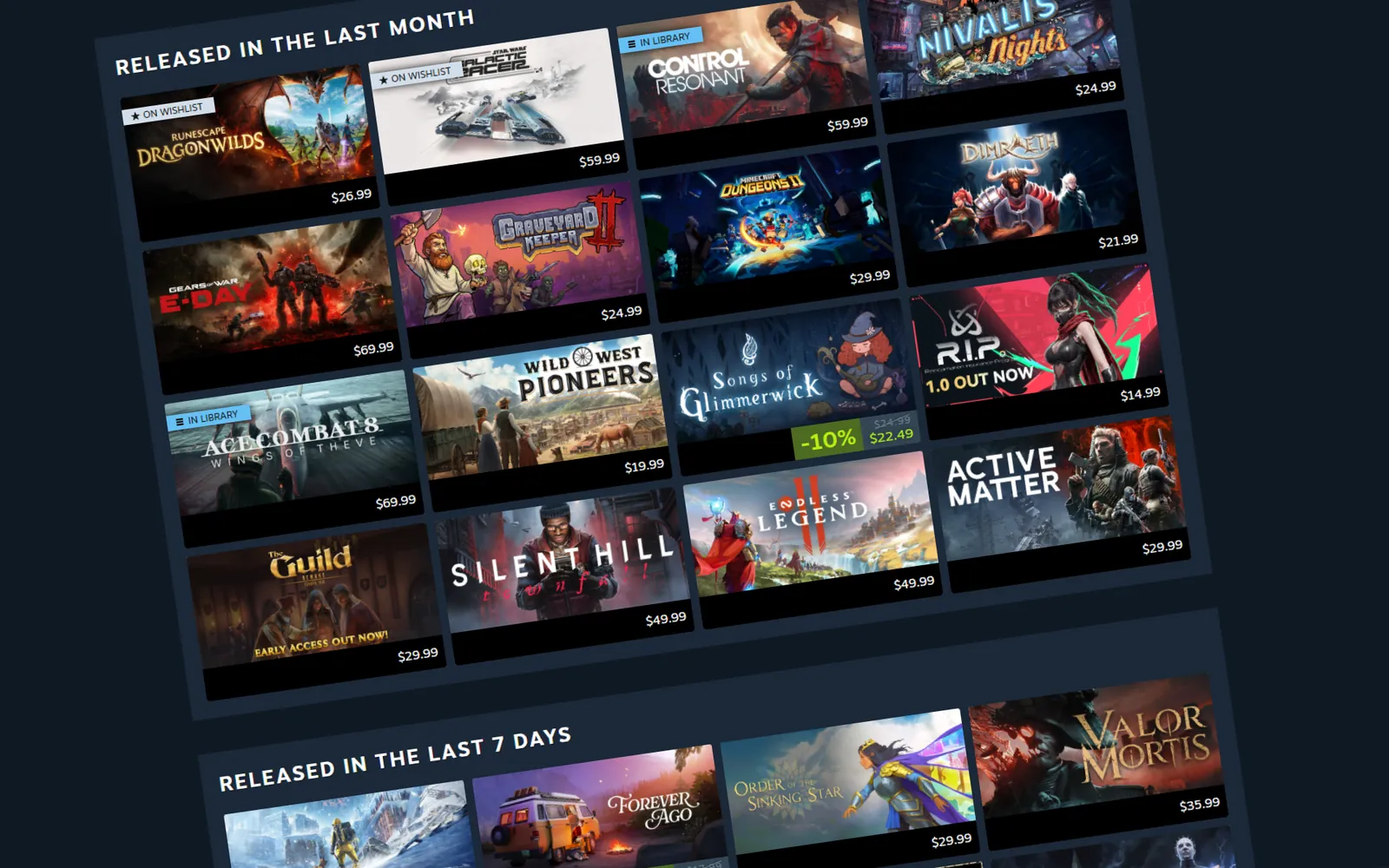
Steam’s Personal Calendar is out of Steam Labs, and it sits right on the store front page. Here’s how it picks games for you, what the filters do and how a game earns a spot.
What is the Steam Personal Calendar?
It’s a list of recently released and upcoming games that Steam picks for each player, laid out by release day. Valve made it a full feature of the Steam store with a Steam update on Oct. 23, 2026. There’s no default calendar that everyone sees: each player gets a calendar built around their own tastes.
The calendar covers popular hits and small games alike. Valve built it to fill a gap between the front page sections that push popular games and the ones that recommend games like yours regardless of release date. On an average day, players click on more than 2,000 different games in their calendars, Valve says.
Where to find it
The calendar appears in two places on the Steam store:
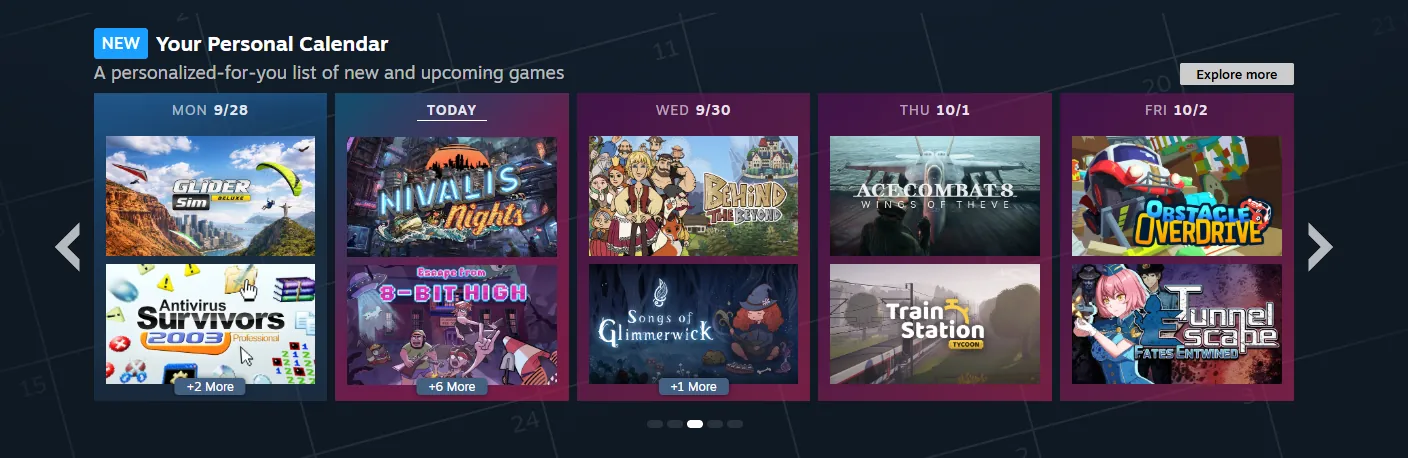
| Place | Range of releases |
|---|---|
| Row on the store front page | This week, 2 weeks back, 2 weeks ahead |
| Dedicated calendar page | 8 weeks |
You browse day by day and open any game’s store page from the calendar. The calendar currently shows Monday through Friday only, since relatively few games launch on Saturday or Sunday; a game that comes out on Saturday or Sunday appears on the following Monday. It works on desktop PC, mobile devices and SteamOS devices such as the Steam Deck.
How does Steam pick the games?
Steam starts from the games you play the most. It finds players with similar tastes, looking at the games they play, how many hours they put in, how that playtime compares with other players and how many achievements they earn. Then it surfaces games those players have been wishlisting or playing, and places each one on its release day.
- Heavy playtime counts mostA few minutes in a new game changes little, while long sessions in a new favorite shift your calendar.
- Daily refreshThe recommendations refresh every day with the latest data. Recommendations change slowly, and new games appear as the eight-week window moves forward and as games lock in dates.
- Wishlists show upEvery wishlisted game appears on its release day as a reminder, unless you hide wishlisted games.
- VarietyValve says a new game in the genres you play that also suits you won’t launch every day, so the calendar draws from a wider pool of genres.
Filters and display options
During the Steam Labs test, Valve added filters and display options for wishlisted games, Early Access games and DLC. Valve’s documentation shows the calendar page from the Steam Labs test with a tag filter, a game count from 10 to 500, a choice to show, hide or show only wishlisted games, and switches that hide owned games and Early Access games.
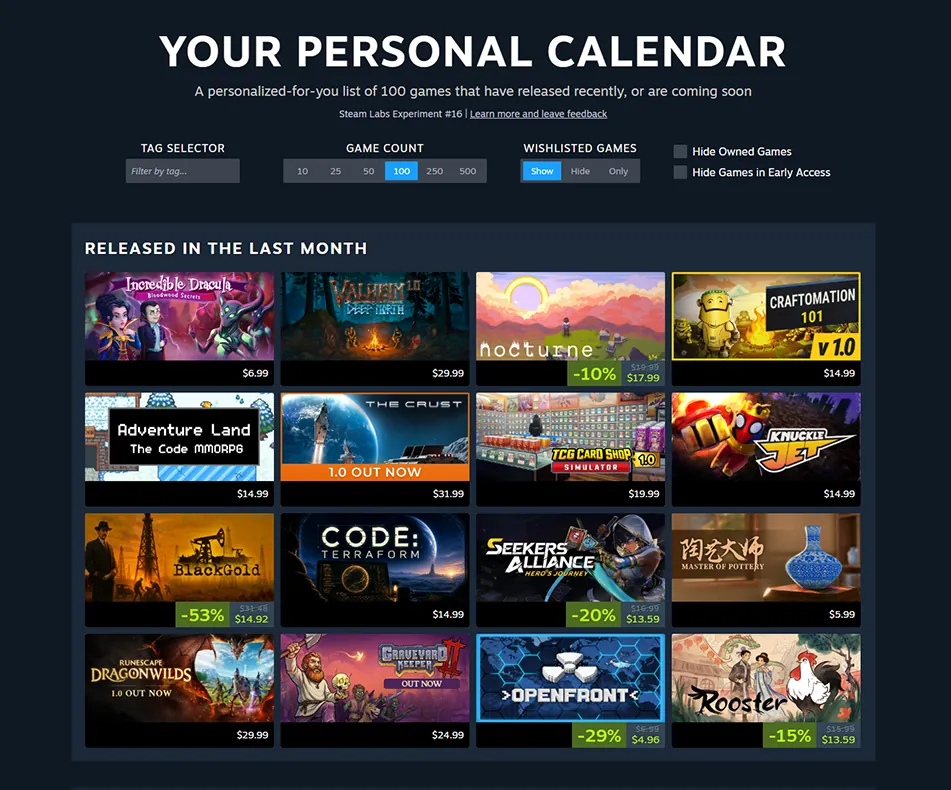
Valve also lets developers set the date a game leaves Early Access for version 1.0, so those launches appear on the calendar as well. Demos never appear, and DLC can show up, but only for players who own the base game.
Does anyone pay to be on it?
Valve doesn’t sell placement on the Personal Calendar, or anywhere else on Steam. The calendar isn’t hand-curated, and Valve staff can’t add a game manually. Featuring is automatic and personal, built from player behavior and wishlists.
Wishlists matter, but there’s no minimum wishlist count, and Valve checks that counted wishlists come from real accounts. A game whose review score falls to Mostly Negative gets recommended far less, in line with how Steam’s automatic featuring works elsewhere on the store.
How a game gets on the calendar
A game needs a visible Coming Soon page with a specific release date, for a full launch or a move from Early Access to 1.0. It can start appearing within about a day of becoming eligible. Valve recommends announcing the date at least 60 days ahead to reach the calendar page and at least three weeks ahead to reach the front page row.
Dates can still change, with one catch: a game that slips by more than 24 hours inside the last two weeks before launch leaves the calendar and returns only once it releases. Shifts of less than 24 hours don’t affect it.
From Steam Labs to a full feature
The Personal Calendar first appeared as a Steam Labs experiment in October 2025. Valve says 11 months of feedback from players and developers shaped the final version, which became a standard part of the store on Oct. 23, 2026.
For the biggest Steam events coming up, see our Steam Next Fest page and our next Steam sale dates. For the week’s biggest launches, see new games this week.
This page is updated as soon as Valve changes how the Personal Calendar picks games or adds new filters.
FAQ
What is the Steam Personal Calendar?
A personal list of recently released and upcoming games on the Steam store, sorted by release day and picked for each player from what similar players wishlist and play. It became a full Steam feature on Oct. 23, 2026.
Where do I find the Steam Personal Calendar?
In a row on the Steam store front page, with an Explore more button, and on its own calendar page in the Steam store. The feature works on desktop PC, mobile devices and SteamOS devices such as the Steam Deck.
How does the Steam Personal Calendar choose games?
Steam looks at the games you play the most, finds players with similar playtime and achievement records, and shows games those players have been wishlisting or playing. Games then land on the day they release.
How often does the Steam Personal Calendar update?
The recommendations refresh every day with the latest data. Day-to-day changes stay small, and new games appear as the eight-week window moves forward and as games lock in release dates.
Why does a game I tried briefly change so little?
The calendar weighs the games you play the most. A few minutes in a new game barely moves your recommendations, while long sessions in a new favorite shift them.
Do wishlisted games show up on the calendar?
Yes. Every game on your wishlist appears on its release day as a reminder, unless you choose to hide wishlisted games.
Do developers pay to get on the Steam Personal Calendar?
Valve doesn’t sell placement on the calendar or anywhere else on Steam. The calendar isn’t hand-curated, and Valve staff can’t add a game manually.
Why are there only weekdays on the calendar?
The calendar currently shows Monday through Friday because relatively few games launch on Saturday or Sunday, Valve says. A game that releases on Saturday or Sunday appears on the following Monday.
Do demos and DLC appear on the Personal Calendar?
Demos don’t appear. DLC can appear, but only for players who own the base game, and software can appear alongside games.
How does a game get on the Steam Personal Calendar?
It needs a visible Coming Soon page with a specific release date. Valve recommends setting the date at least 60 days ahead for the calendar page and at least three weeks ahead for the front page row.
Pop quiz
1 questions from this story.
How many weeks of releases does the dedicated Steam Personal Calendar page show?
The dedicated page shows eight weeks of releases, while the front page row covers five.
Your call
Have you found a game through the Steam Personal Calendar?


